
Guide · ai youtube thumbnail generator
Free AI YouTube Thumbnail Generator
Use this free AI YouTube thumbnail generator to open a 16:9 studio preset, describe your video hook, leave room for a title overlay, then download a clickable concept frame.
Opens the homepage studio with a matching aspect ratio and starter prompt. free AI image generator homepage
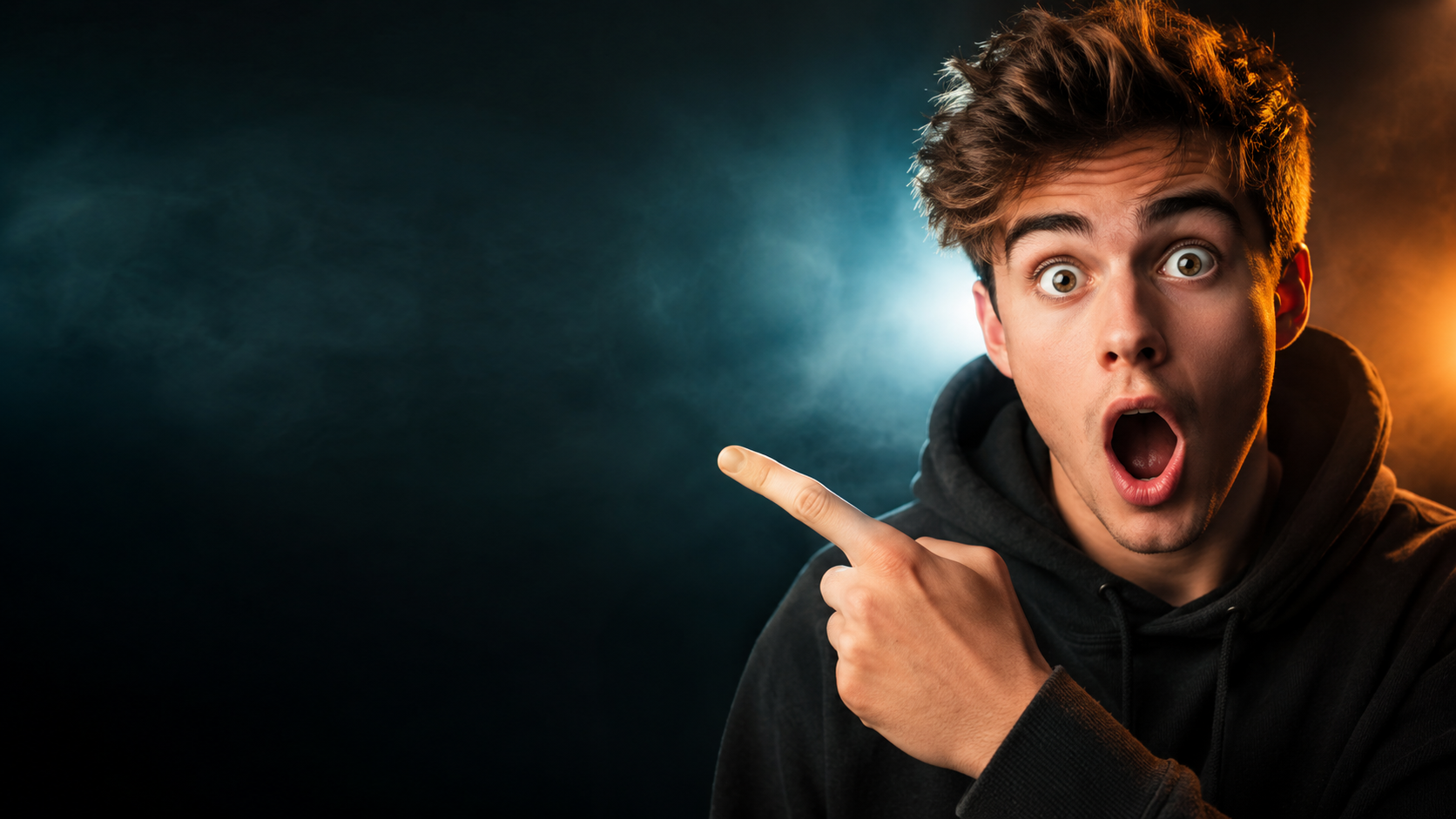
AI YouTube thumbnail generator examples
Sample outputs in this use case. Open the studio preset above to generate your own variation.

What is an AI YouTube thumbnail generator?
An AI YouTube thumbnail generator turns a short text prompt into a landscape cover frame you can refine before upload. Instead of starting from a blank canvas in a design app, you describe the subject, emotion, and lighting — then generate a 16:9 concept with space for your video title.
AI for Image Generation runs this free AI YouTube thumbnail generator in the browser. Guests get a daily free quota with no login required; signing in unlocks credits, higher quality, and history. Pick 16:9 for classic YouTube covers, generate a concept, then export WEBP, PNG, or JPEG.
Treat the output as a clickable concept frame. Many creators still add final title text in Canva or an editor because small AI lettering can warp — and that workflow is normal for a serious AI YouTube thumbnail generator pipeline.
Why you need an AI YouTube thumbnail generator
YouTube is a visual search engine. Before anyone hears your hook, they judge the frame. A weak thumbnail means fewer clicks even when the video is excellent — which is why a dedicated AI YouTube thumbnail generator pays off for solo creators who cannot afford a designer on every upload.
Manual design is slow when you publish weekly or daily. Stock photos look generic. Screenshot grabs from the video often look muddy at phone size. An AI YouTube thumbnail generator lets you iterate mood, pose, and background in minutes instead of rebuilding layers from scratch.
The goal is not a finished upload on the first try. The best workflow is: generate a strong base image with this AI YouTube thumbnail generator, add crisp typography in your editor, A/B test two variants, then publish. Speed plus iteration beats one perfect Photoshop session you never finish.
- Higher click-through rate when the subject reads clearly at 120×68 px mobile size.
- Faster iteration when you batch several AI YouTube thumbnail generator concepts before picking one.
- Consistent channel look when you reuse lighting and color cues across prompts.
YouTube thumbnail size and specs (2026)
YouTube recommends a 16:9 aspect ratio with a minimum width of 640 pixels. The platform accepts uploads up to 2 MB. For sharp results on TVs and retina phones, aim for 1280×720 pixels — the classic HD thumbnail size most creators target after exporting from an AI YouTube thumbnail generator.
Safe zones matter. YouTube may crop edges slightly on some surfaces. Keep faces, products, and title text away from the far corners. When you prompt this AI YouTube thumbnail generator, ask for the subject in the left or right third and leave a clean title-safe band on the opposite side.
File type: JPG, PNG, GIF, or WEBP. PNG preserves edges when you add text later; JPG keeps file size small. Generate composition first in the AI YouTube thumbnail generator, then resize to exact 1280×720 in Canva, Figma, or Photopea if your export is close but not pixel-perfect.
Quick reference: YouTube thumbnail dimensions
- Aspect ratio: 16:9 (landscape).
- Recommended resolution: 1280×720 px.
- Minimum width: 640 px; maximum file size: 2 MB.
- Use 9:16 only when designing Shorts-style vertical covers — not classic watch-page thumbnails.
How to write prompts for the AI YouTube thumbnail generator
Strong prompts name three things: subject, emotion, and composition. Weak prompts describe the whole video plot. The AI YouTube thumbnail generator works best when you write like a photographer briefing a shoot, not like a script summary.
Always mention where title space should sit. Example: “Creator on the right pointing at a glowing laptop, high contrast, empty dark gradient on the left third for bold title text, 16:9 YouTube thumbnail.” That single line gives the AI YouTube thumbnail generator framing, energy, and a readable overlay zone.
Add reference images when you want likeness. Upload a selfie or channel still, then describe expression and pose. Combine with the free text to image AI studio when you need a fresh scene without references.
Prompt templates that work
Copy a template, swap nouns for your niche, generate two variants, then pick the one that still reads at thumbnail size. That is how most creators use an AI YouTube thumbnail generator efficiently.
- Reaction face: “Close-up shocked expression, subject right third, neon rim light, empty left for title, ultra saturated, 16:9.”
- Tutorial: “Clean desk setup, hands on keyboard, cool blue screen glow, subject center-right, title-safe left band, sharp focus.”
- Versus: “Split frame, product A left vs product B right, dramatic center divider, high contrast, space for VS badge and title.”
- Story: “Cinematic wide shot, character silhouette against orange sky, minimal clutter, title area lower left, movie-poster energy.”
Common YouTube thumbnail styles (and when to use each)
Different niches reward different visual languages. Your AI YouTube thumbnail generator prompt should match what viewers already click in your category — not what looks prettiest in full resolution.
Face-forward reaction
Gaming, commentary, and challenge videos rely on exaggerated expressions and tight crops. Prompt for a single face filling the right half, bright rim light, and a simple background so emotion survives mobile compression.
Object + arrow / before-after
Tech, finance, and how-to channels often show a product, chart, or screenshot with high contrast. Ask the AI YouTube thumbnail generator for one hero object and negative space for a short title — avoid cluttering both halves.
Cinematic still
Documentary, travel, and film-analysis channels use wider shots and muted grades. Lower saturation can still win clicks if the silhouette is strong. Mention “single clear subject” so the frame does not turn into busy wallpaper.
Minimal typography-led
Some education channels use bold color blocks and huge type. Generate a clean background with the AI YouTube thumbnail generator, then add type yourself — AI text inside the image is still unreliable for small lettering.
AI YouTube thumbnail generator vs Canva and other design tools
Canva, Figma, and Photoshop excel at typography, brand kits, and pixel-perfect 1280×720 exports. They are weaker when you need a fresh photographic scene fast or when you are not a designer. An AI YouTube thumbnail generator fills that gap: invent the image, then finish in your favorite editor.
Many creators combine both. Generate the base frame here — subject, lighting, background — then import to Canva for fonts, strokes, and brand colors. Canva’s own AI image features are convenient inside their editor; this AI YouTube thumbnail generator is optimized for 16:9 hook frames and deep-links into our studio with a thumbnail starter prompt.
Adobe Express, Snappa, and Visme follow the same pattern: layout and text tools first. Use this page when you want a free AI YouTube thumbnail generator with no app install, a daily guest quota, and optional reference uploads for image-to-image guidance via our online image to image AI mode.
How to generate a YouTube thumbnail with AI
Step 1
Launch the 16:9 preset
The CTA below opens the homepage studio with landscape 16:9 and a thumbnail-oriented starter prompt tuned for this AI YouTube thumbnail generator.
Step 2
Describe the hook, not the whole video
Name the subject, emotion, and where title space should sit (left or right third). Ask for high contrast and a readable silhouette at small size.
Step 3
Optional face or brand reference
Upload a selfie or channel-style still if you want likeness. Keep the prompt focused on framing and energy.
Step 4
Generate, then add final typography
Download the frame and overlay your title in an editor sized toward YouTube’s recommended 1280×720 thumbnail dimensions.
Limitations and best results
- AI text inside the image is unreliable — leave a blank title zone when possible.
- Exact 1280×720 pixels are not guaranteed; generate composition first, then resize.
- Faces against busy backgrounds lose punch at mobile size — prefer simple backdrops.
- Guest daily quota applies; sign in when you need more iterations from the AI YouTube thumbnail generator.
Frequently asked questions
Is there a free AI thumbnail generator?
Yes. This free AI YouTube thumbnail generator includes a daily guest quota with no login required. Sign in for credits, higher quality options, and generation history.
Is this YouTube thumbnail tool free?
Guests get a free daily generation quota. Sign in for credits, higher quality options, and history.
What size should a YouTube thumbnail be?
Use a 16:9 aspect ratio. YouTube recommends 1280×720 pixels for sharp display. Generate composition here, then resize to exact pixels if needed.
Should I use 16:9?
Yes for classic YouTube landscape thumbnails. You can also try 9:16 if you are designing Shorts-style covers.
Can I upload my face?
Yes. Add reference images, then describe the expression and composition you want.
Will the title text look perfect?
Often not. Generate a strong image with empty space, then add crisp title text in your usual editor.
How is this different from Canva?
This AI YouTube thumbnail generator focuses on inventing the photographic frame fast. Canva is better for fonts and brand templates. Most creators use both.
Do I need to install an app?
No. Everything runs in the browser on aiforimagegeneration.com.